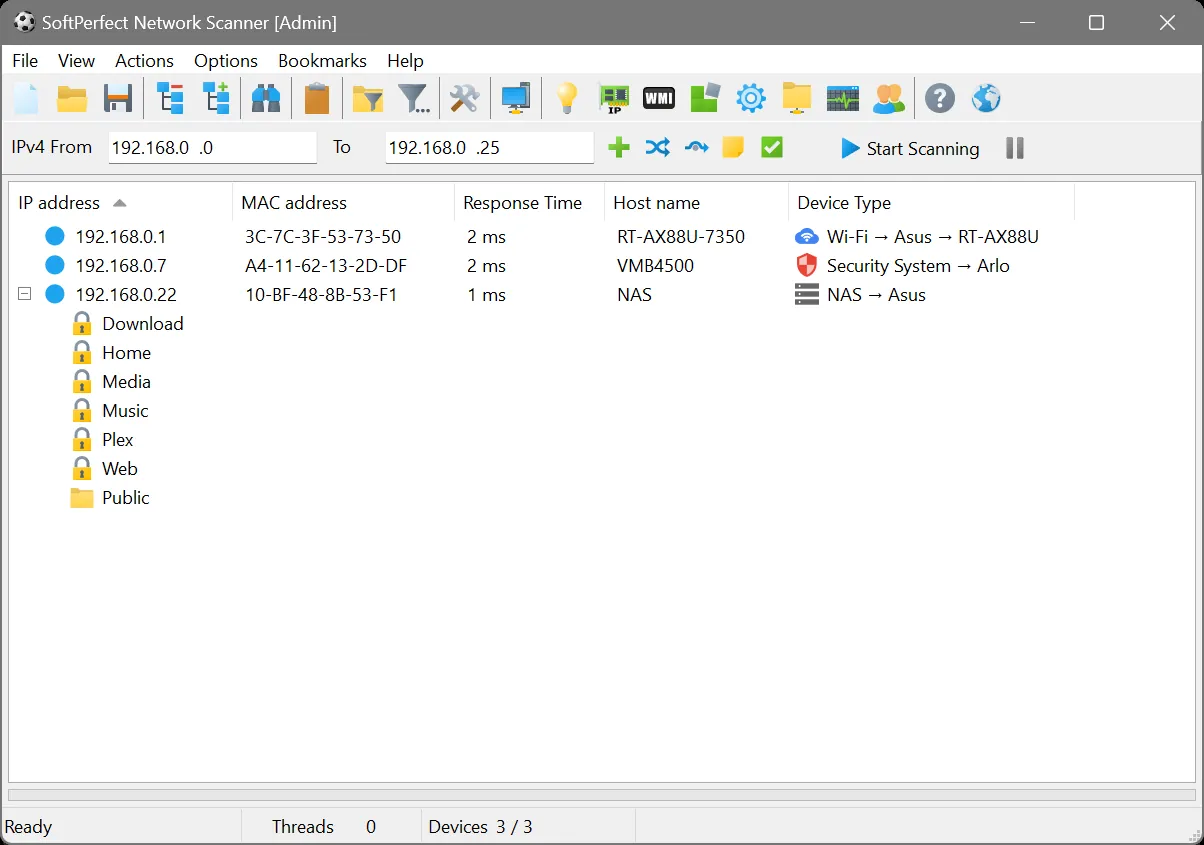
Picture an accounting firm with two small offices, linked by a site-to-site VPN, facing a question a basic scanner can’t answer: “Which PCs still have that old shared folder open to Everyone, and who is logged on to them right now?” Ping sweeps tell you a machine exists. SoftPerfect Network Scanner is the tool to reach for when the next question is what’s on it, who’s using it, and what it exposes, and when the person asking still expects one tidy table rather than a command line.
Before you point it at anything: Several of this tool’s features — remote registry reads, WMI queries, remote command execution — need administrative credentials and should only ever be used on networks and machines you administer or are formally engaged to assess.
What it does
SoftPerfect Network Scanner is a small, portable scanner from the Australian developer SoftPerfect. It runs without a full installation if you choose, which suits a USB stick in a technician’s bag. A scan combines several discovery methods — ICMP ping, ARP on the local segment, and TCP/UDP probes for hosts that ignore ping — and then gathers details per host:
- hostname, MAC address and vendor
- shared folders, including hidden and admin shares, with their access level
- currently logged-on users (on Windows hosts, with credentials)
- open TCP and UDP ports from a list you set
- WMI queries for things like OS version, serial number or installed memory
- SNMP reads from switches, printers and other managed devices
- remote registry values and Windows service states
Beyond collection, it can send Wake-on-LAN, trigger remote shutdown, and run a command on a remote Windows host. Results export to CSV, HTML, XML or JSON, and scans can be run from the command line for scheduled use.
On a network like that, one scan profile with a WMI query for serial number and a column for shares, run across both subnets over the VPN, would typically turn up a list of the machines still sharing the old folder within twenty minutes of starting.
Where it is strong
Depth without a server. You get a lot of the information that inventory platforms collect, straight from a desktop app, without deploying a database or agents. For a 20-to-150-device office that is often exactly the right amount of tooling.
Configurable columns. Custom WMI, SNMP and registry columns mean the table can answer your specific question — BIOS version, printer page count, a registry flag — rather than a fixed set of fields.
Good at finding the shy ones. Mixing ARP, ping and port probes catches devices that a ping-only sweep misses. That improves how trustworthy the resulting list is.
Multiple platforms. Alongside the long-standing Windows edition, SoftPerfect offers builds for other desktop platforms including macOS; check the product page for the current list and feature parity, because the Windows build has historically had the most Windows-specific features.
Where it falls short, and who should skip it
The unlicensed edition is capped. Without a license, results are limited to a small number of devices (ten, at the time of writing). That is enough to evaluate the tool, not to survey an office.
Denser interface. There are a lot of options, and the defaults don’t turn on every useful column. A non-specialist can get lost in the settings. The quick path is to ignore WMI and SNMP at first and just run a basic scan.
Credentials do the heavy lifting. Users, WMI and registry data need admin credentials and Windows firewall rules that allow remote management (RPC on TCP 135 plus dynamic ports for WMI). On a home network or a tightly locked-down domain, a lot of cells will stay blank.
Snapshots, not tracking. It doesn’t keep a history of assets or alert you when something changes. Exporting and comparing is manual.
Security tools may object. Remote command execution and share enumeration are exactly what endpoint detection products watch for. Coordinate with whoever runs security monitoring before scanning a corporate network.
Skip it if you only need names and addresses (the free tools do that), or if you need continuous inventory with history, in which case Lansweeper is a better category of product.
Who it suits
IT contractors serving small businesses, in-house admins at firms without an asset management platform, and anyone who regularly needs a one-off answer to “which machines have X” across a Windows network they manage.
Licensing and cost
SoftPerfect Network Scanner is proprietary, commercial software sold as a one-time purchase rather than a subscription at the time of writing. Licenses come in tiers based on who uses it and where — from a single-user or personal license up to site-wide and worldwide licenses for organizations — with the unlicensed edition acting as a capped trial. Prices and tier names change, so check the vendor’s current pricing page before budgeting. Older freeware versions still circulate on third-party sites; we would avoid them, since they’re unmaintained and you can’t verify where the copy came from.
How it compares
The closest free rival is Advanced IP Scanner, which is simpler and uncapped but much shallower; we put them side by side in SoftPerfect vs Advanced IP Scanner. Angry IP Scanner is the open-source option if you mostly need speed and cross-platform support. For ongoing inventory with history and reporting, Lansweeper sits a level above. For a narrower, cheaper share-permission check on older Windows machines, LizardSystems Network Scanner lists shares with read/write access per account, but it has had no release since 2021. See how all of them stack up on our IP scanners and discovery and inventory pages.
Getting it safely
Get it only from softperfect.com. SoftPerfect signs its Windows executables, so after fetching it:
- Check Properties → Digital Signatures shows SoftPerfect as the signer.
- Compare the file’s SHA-256 with any value the vendor publishes, using
Get-FileHashin PowerShell orshasum -a 256on macOS. - Buy license keys directly from the vendor or its listed resellers; cheap keys from marketplaces are frequently resold or revoked.
We host nothing. Our where to get it page has the full checklist.
FAQ
What happens when I hit the device limit?
The unlicensed edition shows results for only a few hosts and hides the rest. Scanning still happens; you just can’t see or export the full list without a license.
Why are the “Users” and WMI columns empty?
Those need valid admin credentials on the target and remote management allowed through its firewall. Set credentials under the scanner’s options and confirm WMI is reachable from your admin PC.
Can it scan across a VPN?
Yes, if routing allows it. You lose MAC addresses and vendor names across routed links, but ping, ports, WMI and SNMP still work.
Is it a replacement for Lansweeper?
Not really. It answers questions on demand; Lansweeper keeps a continuously updated inventory with history and reports.