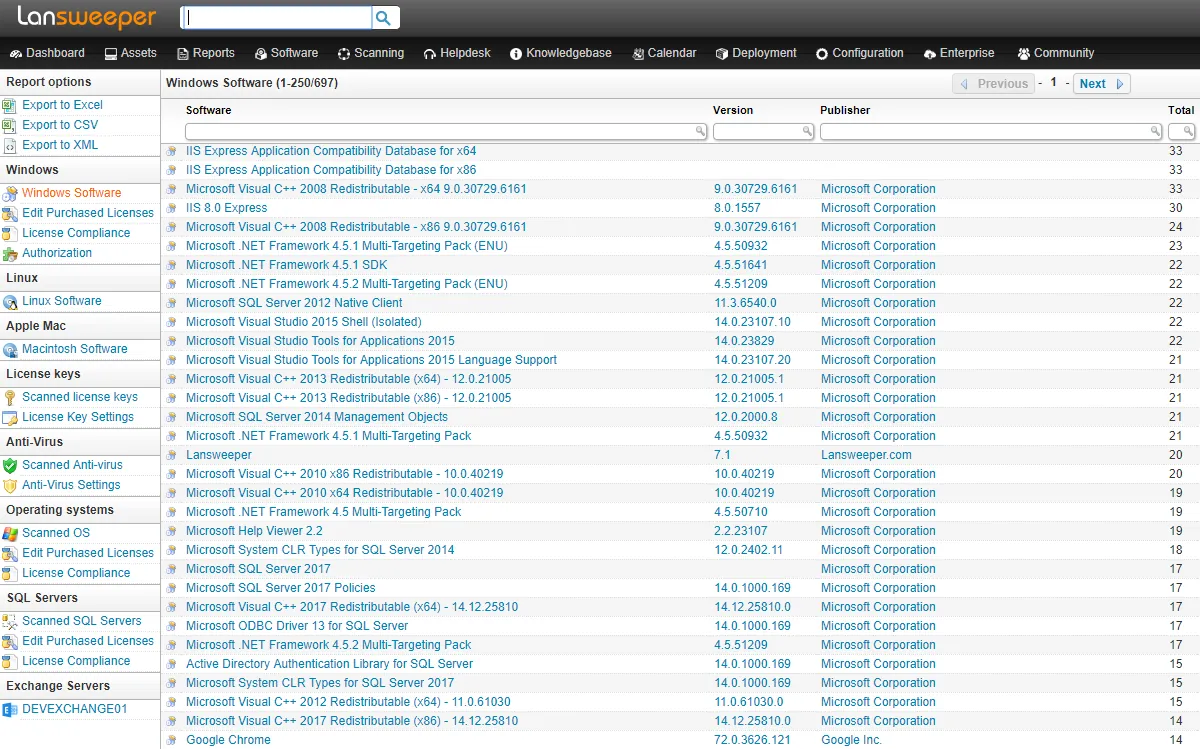
Picture a 180-person logistics company that gets a cyber-insurance renewal questionnaire with three questions the office manager can’t answer from a spreadsheet: how many endpoints run an unsupported operating system, which laptops haven’t checked in for 30 days, and which network devices are past end of warranty. A one-off scan would give a device list that’s out of date by Friday. What a company like that needs is an inventory that keeps itself current. That’s the jump from scanner to asset platform, and Lansweeper is one of the best-known products on the far side of it.
Before you point it at anything: Lansweeper uses administrative credentials to query devices. Deploy it only on networks and systems your organization owns or manages, with credentials issued for that purpose.
What it does
Lansweeper is an IT asset discovery and inventory platform from the Belgian company of the same name. It combines several ways of finding and describing devices:
- Agentless credentialed scanning — WMI for Windows, SSH for Linux, macOS and Unix hosts, SNMP for switches, printers, UPS units and other network gear, plus VMware and cloud connectors.
- Passive discovery (marketed as Asset Radar) that notices new devices appearing on the network without waiting for the next scheduled scan.
- LsAgent, a lightweight agent for laptops and machines that are often off the office network.
- Operational technology (OT) scanning for industrial devices, where supported.
Everything lands in a central inventory with hardware details, installed software, logged-on users, warranty data and relationships between assets. The platform offers built-in and custom reports, dashboards and alerts, and integrations with service desks and CMDBs.
Deployment has two layers: an on-premises scanning component — historically a Windows server running the Lansweeper scanning service and a SQL Server database — and the Lansweeper cloud platform, which aggregates one or more of those “sites” into a web console. Check the vendor’s current documentation for exact topology, since it has evolved over the years.
Where it is strong
Accuracy through credentials. Instead of guessing from MAC prefixes, it logs in and reads the facts: exact model, serial number, BIOS version, installed updates, software list. For “trustworthy device list,” this is the gold standard, provided the credentials work.
Always current. Scheduled and event-driven scanning keeps records fresh; you can see when an asset was last seen and what changed. Reports like “Windows 10 machines” or “devices not seen in 30 days” answer auditors directly.
Breadth. Windows, Linux, Mac, network gear, printers, virtual machines, cloud resources and, in the right edition, OT devices — in one inventory.
Reporting. A large library of prebuilt reports, plus custom reports, and the ability to export for auditors or finance.
Where it falls short, and who should skip it
Setup is a project. Expect to plan credentials, open firewall ports for WMI (RPC on TCP 135 plus the dynamic range) and SSH, enable SNMP on network gear, and possibly deploy LsAgent. For a non-specialist, the first good inventory is a matter of days, not minutes. Budget time for it.
Commercial and per-asset. It’s paid software, and costs scale with the number of assets. For a home network or a ten-device office that’s out of proportion.
Credential sensitivity. A service account with admin rights on many machines is a high-value secret. You need a plan for least privilege, rotation and protecting the scanning server.
Needs a place to run. The on-premises scanning part wants a Windows machine that’s always on. Tiny offices without a server feel that overhead.
More than you need for one question. If the task is “find the printer’s new IP,” Lansweeper is the wrong tool; Advanced IP Scanner or Fing will do it in a minute.
Skip it if you have fewer than a few dozen devices, no one to own the platform, or only occasional “what’s on the network” questions.
Who it suits
Organizations from roughly 50 devices upward, with at least one person responsible for IT, facing audit, insurance, licensing or lifecycle questions. Managed service providers also use it across client networks under contract.
Licensing and cost
Lansweeper is commercial software sold as a subscription, with pricing based mainly on the number of assets you inventory and on the edition (higher tiers add features such as advanced integrations, OT coverage or more sites). A time-limited trial lets you run it against your own network before committing. At the time of writing, the vendor presents plans on its pricing page and quotes larger deployments directly. Edition names, asset bands and prices change, so check the vendor’s current pricing page and request a quote for your real asset count. We have no commercial relationship with Lansweeper.
How it compares
Lansweeper’s closest neighbor in this catalog is SoftPerfect Network Scanner, which gathers similar WMI and SNMP data on demand but keeps no history. Fing offers device recognition and change alerts for homes and small offices, without credentialed depth. For raw discovery accuracy on a subnet, Nmap remains a useful cross-check against what the inventory believes. Our discovery and inventory category lays out the whole range, and if you’re starting from zero, the inventory spreadsheet guide is a useful stepping stone before a platform.
Getting it safely
Start at lansweeper.com and sign up for the trial from there, which gives you access to the components for your chosen deployment. Then:
- Confirm any Windows components are signed by Lansweeper under Properties → Digital Signatures.
- Create a dedicated scanning account with only the rights needed, not a domain admin you use for everything else.
- Keep the scanning server patched and restrict who can log in to it.
We host nothing and have no reseller role. Our where to get it page lists vendor sites for every product we cover.
FAQ
Is there a free version of Lansweeper?
It’s a commercial product with a trial. Any reduced or no-cost options change over time, so confirm on the vendor’s pricing page rather than assuming one exists.
Does Lansweeper need agents on every PC?
No. Most Windows, Linux and network devices can be scanned agentlessly with credentials. LsAgent is useful for laptops that are rarely on the office network.
Why are some Windows machines showing as “unidentified”?
Usually WMI access is blocked by the host firewall, or the scanning credentials lack rights. Check the scan errors page and firewall rules for RPC and WMI.
How long before we have a usable inventory?
For a 100–200 device office with credentials ready, a first useful inventory is realistic within a few days, with refinement over the following weeks.