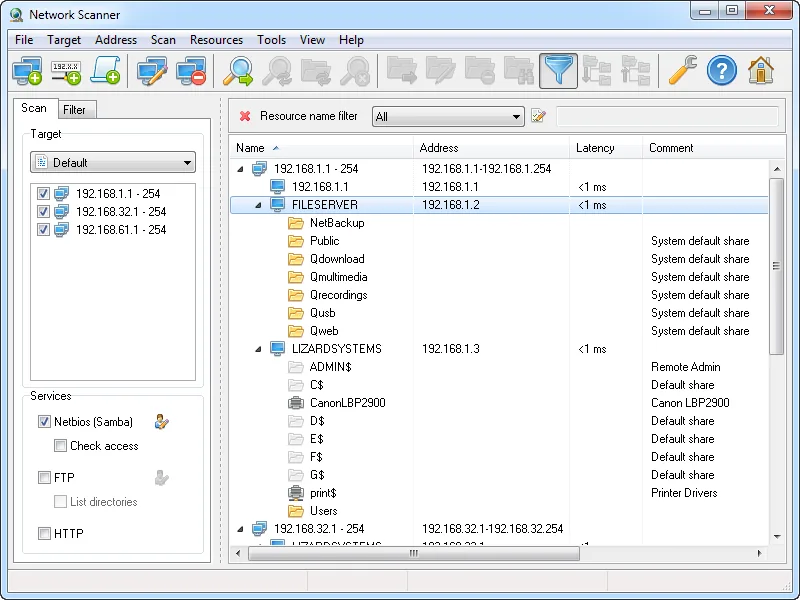
Picture a twelve-person office where, years ago, somebody shared a folder called “Scans” on the reception PC with Everyone so the copier could drop PDFs into it. Since then more desktops have grown shares, a NAS has arrived, and nobody can say which folders a visitor’s laptop could open, let alone write to. LizardSystems Network Scanner is built around that narrow question. It is less interested in drawing a complete device map than in listing the shared resources on each machine and telling you what a given account is allowed to do with them.
Before you point it at anything: Enumerating shares and testing access rights with another person’s username is only appropriate on machines you own or administer, or where you have written permission from whoever does.
What it does
You give it IP ranges, single addresses or computer names; since 2016 it also accepts expressions such as 192.168.1-2,5,20,25-27.1-254.
It decides whether each host is alive by ping or by connecting to ports you specify — a status check, not a port scanner. For live hosts it retrieves:
- the NetBIOS or domain computer name
- NetBIOS (SMB/Samba) shared resources, including system and hidden shares — the ones whose names end in
$ - FTP and web resources
- read and write access for the current user, or for any other account you enter
- latency, plus “first scan” and “last scan” times
Results can be filtered by resource type, access rights or share name. A share can be mapped as a network drive or opened in Explorer or a browser, and “Open as” shortcuts cover web, FTP, Telnet and RDP. A Tools menu adds remote shutdown and send-message. Scans can be saved and exported as HTML, TXT or XML. Scanning needs no administrator rights; the vendor claims “thousands of computers per minute”, a figure we have not measured.
The vendor does not claim MAC address or manufacturer lookup (LizardSystems sells that separately), SNMP, IPv6 scanning, CSV export or a command line.
Where it’s strong
It answers the permission question directly. The access column says whether the account you tested can read a share, write to it, or neither. A useful routine: create a plain non-admin test account, scan once as yourself and once with its credentials, then filter to writable resources. Anything the test account can write to deserves a second look.
Hidden shares are not skipped. Shares ending in $ don’t appear when you browse the network in Explorer, which is why forgotten ones linger.
It is small and undemanding. The 32-bit build is about 3 MB, the stated requirements are a 1 GHz CPU and 512 MB of RAM, and since 2019 there has been a non-admin install mode. It will run on almost any spare Windows PC.
Where it falls short, and who should skip it
No releases for more than five years. Version 21.07, released on July 7, 2021, is still labelled “Latest”. Windows file-sharing defaults have kept changing since then, so confirm results on your own network rather than assume them.
Windows 11 is not on the supported list. The vendor lists Windows 7, 8, 8.1 and 10, plus Server 2008 R2, 2012, 2012 R2 and 2016. Windows 11 and Server 2019, 2022 and 2025 are simply not listed. That doesn’t mean it fails on them, only that the vendor hasn’t said it works. The FAQ still lists Internet Explorer 8 as a requirement.
It is not an inventory tool. Without MAC addresses or manufacturer names, an unfamiliar gadget is just an address, and without CSV export results need converting before they reach a spreadsheet.
Skip it if you use a Mac or Linux laptop, if you need a device inventory rather than a share list, or if your organisation will not pay for a licence on software with no recent updates.
Who it suits
It suits an office manager or solo IT person on a small Windows network who wants to clean up shares once. It also fits a homelab owner checking which NAS and PC shares a guest account can reach, since personal use is free.
Licensing and cost
There are two licences. The Personal License is free for non-commercial use only and perpetual. The Business License is a commercial licence per machine, listed at US$79.95 per licence at the time of writing, perpetual, with one year of free updates and email and ticket support. Given the release history, that year of updates may not bring anything new. The FAQ adds that every installation on a separate machine needs its own licence.
The evaluation terms are worded inconsistently across the vendor’s site. The FAQ describes an unregistered evaluation period with no functional limits, on one computer in the network, with nag screens. The company page mentions a 30-day evaluation for every product. The product page just says “free for personal use” and does not explain how that licence is activated. Before a business relies on it, read the EULA and the current purchase page.
How it compares
Advanced IP Scanner is free, also lists shared folders, adds MAC vendors, and is the easier way to get a general device list. SoftPerfect Network Scanner shows shares with their access level plus WMI and SNMP data, at a higher price. We compare those two in SoftPerfect vs Advanced IP Scanner. Angry IP Scanner is the cross-platform, open-source choice if the survey has to run on a Mac. The full line-up is on our IP scanners page.
Getting it safely
Get it only from the product page at lizardsystems.com. The vendor publishes a SHA-256 hash for the current 21.07 build:
5421a6ddb26a2a9e56f7959e927d0f2158c0cfb44c55d4d2fee1c427ce63f8d6Compare it with Get-FileHash .\the-file-you-received -Algorithm SHA256 in PowerShell, avoid mirror sites, and buy keys only from the vendor or its listed resellers. We host nothing; our where to get it page has the full checklist.
FAQ
Does it run on Windows 11?
Windows 11 is not in the vendor’s supported list, which ends at Windows 10 and Server 2016. It may work, but that is unconfirmed, so try it on a non-critical PC first.
Can a small business use the free version?
No. The free Personal License is for non-commercial use only. Business use needs a paid licence for each machine it is installed on.
Is it a port scanner?
No. It can connect to ports you name, but only to decide whether a host is online. For a list of open services, use a dedicated port scanner.
Why does a share show no access?
The account you tested has neither read nor write rights on it, or the host refused the connection. Rescan with the credentials of an account that should have access to tell those two cases apart.